
Remote support for internal IT teams.
Support employees, maintain managed systems and keep supported company devices patched from one practical platform.
RemoteViewer gives internal IT teams attended and unattended remote access, Patch Management and remote administration tools across supported Windows, macOS, Linux, iOS and Android environments, with desktop, browser and mobile technician access.
Everything your IT team needs to support and maintain users remotely.
|
Employee Support
Connect to employees while they are present and provide real-time help with supported desktop and mobile devices. |
Unattended Access
Reach authorised company computers and managed systems when no employee is present for maintenance and administration. |
Patch Management
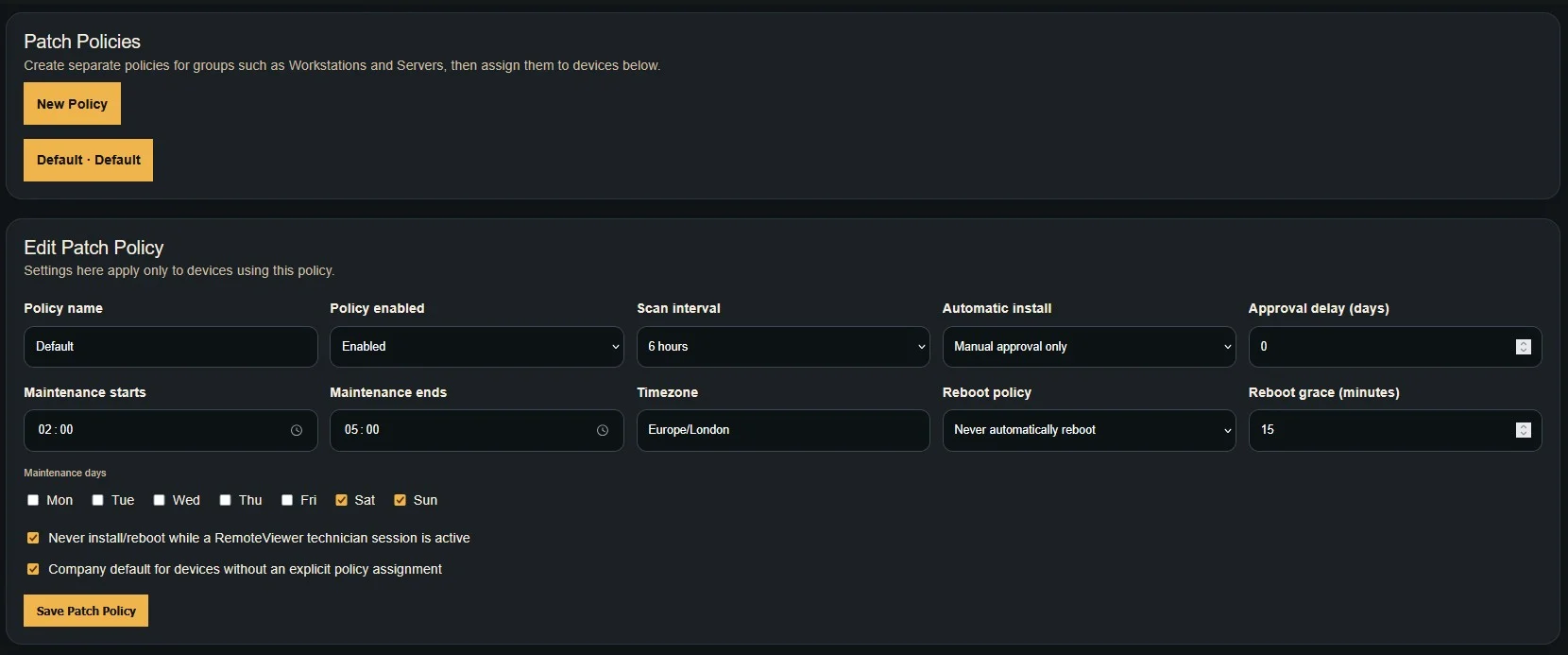
Create patch policies, review available updates and manage supported patch deployment across company devices. |
|
Browser Technician Access
Launch supported remote sessions from a compatible browser when working from a temporary or shared workstation. |
Remote Desktop Control
View and control supported company desktops remotely using technician keyboard and mouse input. |
Remote Administration
Use file operations, remote commands and supported administrative actions without leaving the technician workflow. |
Support users and systems wherever they are.
Internal IT rarely supports one location or one type of device. RemoteViewer gives your team practical remote access and endpoint maintenance tools across offices, remote workers and managed infrastructure.
|
Office Users Support employees across desks, departments and office locations from your central IT team. |
Remote Employees Assist employees working from home or remote locations without requiring them to return to the office. |
Managed Infrastructure Maintain authorised access to supported systems, manage supported patches and carry out ongoing administration across your managed estate. |
|
PATCH MANAGEMENT FOR INTERNAL IT
Keep company devices maintained without another disconnected platform.
|
|
One IT team. Multiple operating systems.
Support mixed business environments across Windows, macOS, Linux, iOS and Android without maintaining a separate remote support platform for every operating system.
|
Windows Full supported desktop remote control, login-screen access and administration. |
macOS Remote support for compatible Mac desktops and managed systems. |
Linux Support compatible Linux desktops and managed headless systems. |
iOS Supported iPhone and iPad screen viewing for employee assistance. |
Android Supported Android screen viewing and compatible remote control. |
Give your technicians access wherever they work.
Use RemoteViewer from supported desktop, browser or mobile technician options depending on the task and where your IT staff are working.
|
Desktop Dedicated technician applications for normal day-to-day IT support and administration. |
Browser Access supported sessions quickly from a compatible web browser without installing the full technician application. |
Mobile Reach supported remote sessions from compatible mobile and tablet devices while away from your desk. |
Designed for authorised internal access.
Configure access around the employees, technicians and managed devices your IT team is authorised to support rather than exposing unrestricted public remote connections.
Built around everyday internal IT work.
|
Help Desk Give your IT help desk fast access to employees who need remote technical assistance. |
Device Administration Use unattended access and Patch Management to maintain authorised company computers, manage supported updates and carry out routine administration. |
Multi-Site IT Support and maintain offices, branches and remote locations without requiring an IT technician at every site. |
Unlimited devices. Simple concurrent-session pricing.
Add the company devices your IT team needs to support without paying separately for every endpoint. Choose your plan according to how many simultaneous remote support sessions your technicians need.
RemoteViewer also brings Patch Management into the same platform, helping your IT team combine user support with ongoing endpoint maintenance.
If your internal IT team is comparing RemoteViewer with TeamViewer, see our dedicated comparison covering supported devices, concurrent support capacity, attended and unattended access and supported platforms.
Give your IT team a better support and maintenance workflow.
Support employees, maintain managed systems and manage supported updates from one RemoteViewer platform.
Start your 7-day free trial and see how RemoteViewer fits your internal IT workflow.