
Remote support for IT support companies.
Deliver fast remote support, ongoing maintenance and Patch Management across the customer devices you look after.
RemoteViewer gives IT support businesses attended and unattended remote access, Patch Management and remote administration tools across supported Windows, macOS, Linux, iOS and Android environments — without charging separately for every device you support.
Everything you need to support and maintain customers remotely.
|
Attended Remote Support
Connect while your customer is present and provide real-time technical assistance directly on their supported device. |
Unattended Access
Access authorised customer computers and managed systems when nobody is present for maintenance and ongoing support. |
Patch Management
Create patch policies, review available updates and manage supported update deployment across customer devices. |
|
Browser Technician Access
Launch supported remote sessions from a compatible web browser when installing the full technician application is inconvenient. |
Remote Desktop Control
View and control supported desktop systems remotely using technician keyboard and mouse input. |
Remote Administration
Use file operations, remote commands and supported administrative actions as part of your normal technician workflow. |
Support customers when they need you — and maintain them when they don’t.
Whether you provide one-off technical support or ongoing managed services, RemoteViewer gives your technicians practical ways to reach, maintain and patch supported customer systems.
Immediate Help Desk Support Connect to customers who contact your support team and need immediate remote assistance. |
Ongoing Customer Support Maintain access to authorised customer systems that require regular technical support and administration. |
Proactive Maintenance Use unattended access and Patch Management to maintain supported customer systems before every issue becomes a support request. |
|
PATCH MANAGEMENT
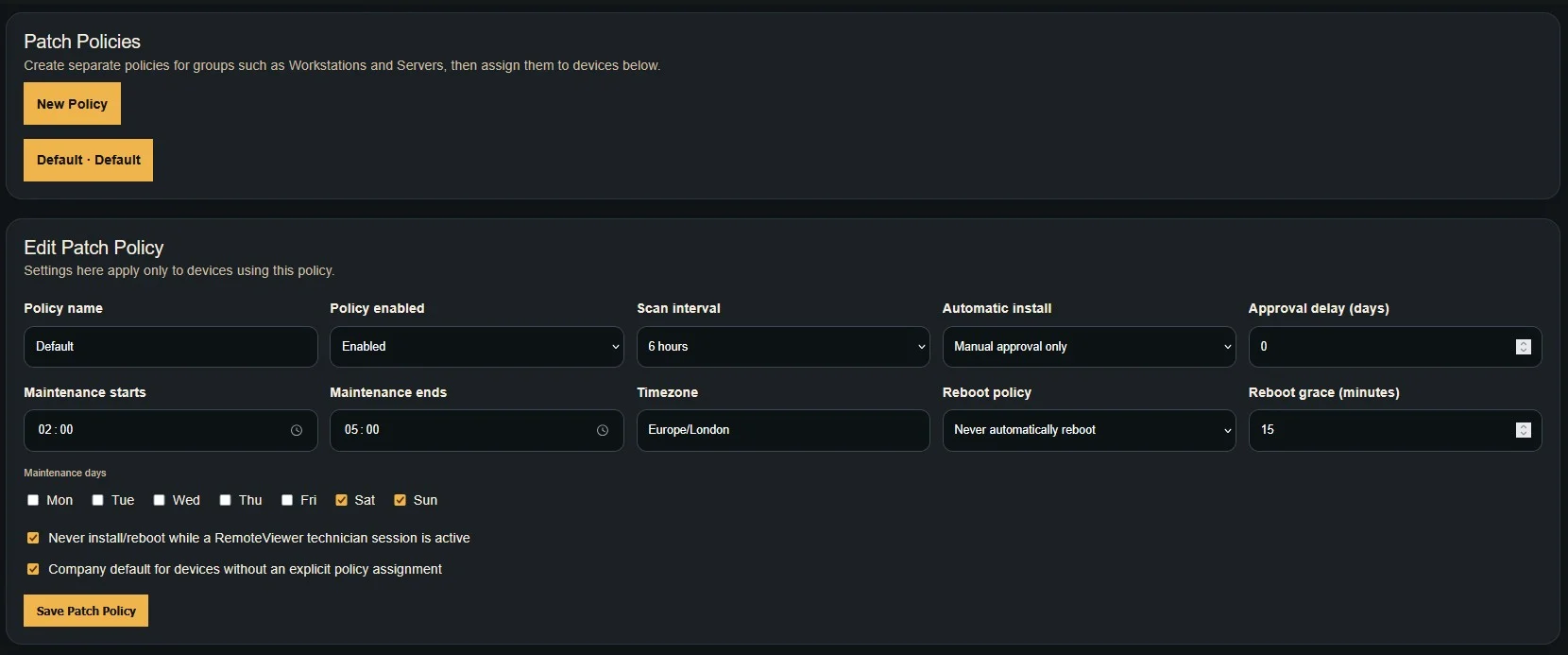
Add proactive endpoint maintenance to your support service.RemoteViewer Patch Management helps your technicians identify and manage supported updates across customer devices from the same platform used for remote support. Create separate policies for different device groups, configure how often endpoints scan for updates and control how patches move from detection to installation. ✓
Create separate patch policies ✓
Assign policies to managed devices ✓
Configure patch scan intervals ✓
Control automatic or approval-based installation ✓
Configure approval delays ✓
Remote into devices that need further troubleshooting |
|
More than screen sharing.
Give technicians practical administration tools for resolving issues and maintaining supported customer systems.
|
File Operations
Upload, download, move, rename and delete files on supported remote systems during customer support work. |
Remote Commands
Run supported administrative commands remotely as part of your normal technician workflow. |
Lock & Reboot
Perform supported lock and reboot actions while administering authorised customer systems. |
One support platform for mixed customer environments.
Your customers use different devices and operating systems. RemoteViewer lets your technicians support compatible desktop and mobile platforms from one remote support service.
Windows Full supported desktop remote access, control and administration. |
macOS Remote support for supported Mac desktops and customer systems. |
Linux Support compatible Linux desktops and managed systems. |
iOS Supported iPhone and iPad screen viewing for remote assistance. |
Android Supported Android screen viewing and compatible remote control. |
Give technicians flexibility in how they work.
Your support team does not always work from the same computer. RemoteViewer provides desktop, browser and mobile technician access for different support situations.
Desktop Technician Use supported dedicated technician applications for your normal day-to-day remote support work. |
Browser Technician Sign in and launch supported sessions from a compatible browser when working from another computer. |
Mobile Technician Reach supported sessions from compatible mobile and tablet devices while away from your desk. |
Unlimited devices on every plan.
Add the customer devices you need to support without paying separately for every endpoint. Choose your RemoteViewer plan according to the number of simultaneous technician sessions your support team needs.
Built for real IT support workflows.
Support Desks Give support technicians fast access to customer systems when remote assistance is required. |
Field Technicians Support additional systems remotely while working away from the office or between customer sites. |
Managed Support Combine unattended access and Patch Management to maintain authorised customer computers and systems that your company supports on an ongoing basis. |
Pay for concurrent sessions, not customer devices.
RemoteViewer plans are based on how many remote support sessions your technicians need to run at the same time, while every plan includes unlimited devices.
Bring remote support and Patch Management into the same platform so your customer device list can grow without turning endpoint count into the centre of your support workflow.
Give your technicians a better way to support and maintain customers.
Support customers when they need help, maintain authorised systems remotely and manage supported updates from the same RemoteViewer platform.
Start your 7-day free trial and see how RemoteViewer fits your IT support company’s workflow.